Spectre.Console Documentation
Create beautiful, cross-platform console applications with Spectre.Console.
Start Here
Get Spectre.Console running in seconds:
bash
dotnet add package Spectre.Console
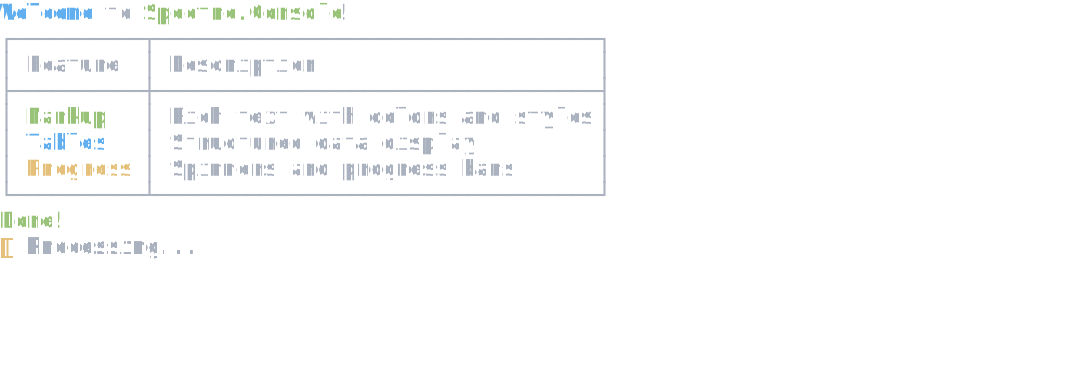
Then try this quick example that demonstrates styled text, a table, and a status spinner:
csharp
{
    // Styled text with markup
    AnsiConsole.MarkupLine("[bold blue]Welcome[/] to [green]Spectre.Console[/]!");

    // A simple table
    var table = new Table()
        .AddColumn("Feature")
        .AddColumn("Description")
        .AddRow("[green]Markup[/]", "Rich text with colors and styles")
        .AddRow("[blue]Tables[/]", "Structured data display")
        .AddRow("[yellow]Progress[/]", "Spinners and progress bars");
    AnsiConsole.Write(table);

    // Status spinner for work
    AnsiConsole.Status()
        .Start("Processing...", ctx =>
        {
            Thread.Sleep(2500);
        });

    AnsiConsole.MarkupLine("[green]Done![/]");    }
Your application should look something like this:
Explore the Documentation
Whether you're just getting started or looking to master advanced features, we've organized everything to help you find what you need. Start with the tutorials to build a solid foundation, then dive into specific topics as your projects grow.
Tutorials
- Building a Rich Console App - A beginner-friendly tutorial that walks through creating a simple console application using Spectre.Console
- Asking User Questions - Learn to ask the user simple questions and use their answers
- Showing Status and Spinners - Display animated spinners while operations are running
- Showing Progress Bars - A beginner-friendly tutorial that walks through creating animated progress bars to track long-running operations
- Creating a Custom IRenderable - Build a reusable Pill widget by implementing the IRenderable interface
How-To Guides
- Prompt for User Input - Collect input from users with text prompts, confirmations, and selection menus
- Display Tabular Data - Display structured data in tables with borders, alignment, and styling
- Show Progress Bars - Display progress bars for long-running operations with percentage completion
- Show Activity Status - Display a spinner for operations without measurable progress
- Escape Markup - Safely display user input, array indexers, and JSON without markup parsing errors
- Write Exceptions - Display formatted exception details with stack traces, colors, and clickable links
- Display Hierarchical Data - Visualize nested structures using tree views with customizable styling
- Organize Layout - Arrange content using panels, columns, grids, and alignment
- Update Content Live - Update console output in-place without scrolling
- Run Tasks with a Spinner - Show a spinner animation while awaiting async operations
- Draw Charts - Visualize data with bar charts, breakdown charts, and calendars
- Test Console Output - Write unit tests for console applications using TestConsole
- Create Custom Renderables - Build your own widgets by implementing IRenderable
- Write ANSI - How to write ANSI/VT sequences and markup without the Spectre.Console library
Widgets
- Text Widget - Render styled text with precise control over formatting and overflow
- Markup Widget - Render styled text using an inline markup syntax
- Panel Widget - Create bordered boxes around content with customizable headers, padding, and styles
- TextPath Widget - Display file paths with intelligent truncation and component styling
- Table Widget - Display tabular data with customizable columns, rows, borders, and styling
- Tree Widget - Display hierarchical data structures with expandable tree views
- Columns Widget - Display content side-by-side in columns with automatic width distribution
- Rule Widget - Create horizontal dividers and section separators with optional titles
- Grid Widget - Arrange content in rows and columns without visible borders for flexible layouts
- Rows Widget - Stack multiple renderables vertically with consistent spacing
- Layout Widget - Create complex multi-section layouts with the flexible Layout widget
- Padder Widget - Add padding around any renderable content
- Align Widget - Control horizontal and vertical alignment of content
- FigletText Widget - Create large ASCII art text banners using FIGlet fonts
- BarChart Widget - Display data as horizontal bars with labels, values, and colors
- BreakdownChart Widget - Display proportional data as a colored bar chart with optional legend
- Calendar Widget - Display monthly calendars with highlighted dates and events
- JsonText Widget - Render JSON data with syntax highlighting and customizable colors
- Canvas Widget - Draw pixel-level graphics and patterns in the console
- CanvasImage Widget - Display image files in the console using pixel-based rendering
Prompts
- TextPrompt - Prompt users for text input with validation and default values
- SelectionPrompt - Let users select a single option from a list with keyboard navigation
- MultiSelectionPrompt - Allow users to select multiple options from a list
Live Rendering
- Progress Display - Show progress bars and task status for long-running operations
- Status Display - Show animated status indicators with spinners for ongoing operations
- Live Display - Update and refresh any renderable content dynamically in real-time
Explanation
- Understanding Spectre.Console's Rendering Model - An in-depth explanation of how Spectre.Console renders text and widgets to the terminal
- Async Patterns - Best practices for using live rendering with asynchronous operations
Reference
- Color Reference - A comprehensive reference of color usage in Spectre.Console
- Markup Reference - Complete reference for Spectre.Console's inline markup syntax including tags, colors, styles, links, and escaping
- Box Border Reference - A complete reference of all box border styles available in Spectre.Console
- Text Style Reference - A comprehensive reference of text styles and decoration options in Spectre.Console
- Capabilities Reference - Complete reference for terminal capabilities, environment variables, and CI detection in Spectre.Console
- Table Border Reference - A complete reference of all table border styles available in Spectre.Console
- Spinner Styles Reference - A reference of built-in spinner animations available for the Status and Spinner APIs
- Tree Guide Reference - A complete reference of all tree guide styles available in Spectre.Console
- Emoji Reference - A list of all emoji shortcodes supported by Spectre.Console's Markup