In this tutorial, we'll build a Pill widget from scratch. By the end, we'll have a reusable component that displays styled labels with rounded end caps - and gracefully falls back on terminals without Unicode support.
What We're Building
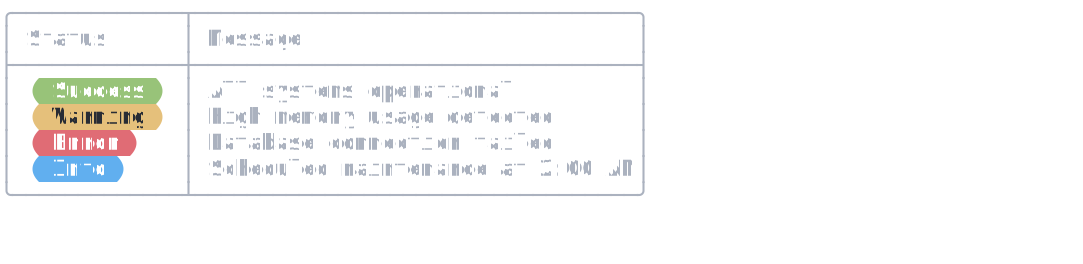
Here's the output we're creating:
Prerequisites
- .NET 6.0 or later
- Completion of the Building a Rich Console App tutorial
- Basic understanding of C# interfaces
- 1
Create the Pill Class
Let's start by defining a
PillTypeenum and creating a class that implementsIRenderable. This interface requires two methods:Measure()to report size constraints andRender()to produce output.public enum PillType { Success, Warning, Error, Info, } public sealed class Pill : IRenderable { private readonly string _text; private readonly Style _style; /// <summary> /// Creates a new pill with the specified text and type. /// </summary> /// <param name="text">The text to display inside the pill.</param> /// <param name="type">The pill type which determines its color scheme.</param> public Pill(string text, PillType type) { _text = text; _style = GetStyleForType(type); } private static Style GetStyleForType(PillType type) => type switch { PillType.Success => new Style(Color.White, Color.Green), PillType.Warning => new Style(Color.Black, Color.Yellow), PillType.Error => new Style(Color.White, Color.Red), PillType.Info => new Style(Color.White, Color.Blue), _ => new Style(Color.White, Color.Grey), }; /// <summary> /// Measures the pill's width in console cells. /// </summary> public Measurement Measure(RenderOptions options, int maxWidth) { // todo } /// <summary> /// Renders the pill as a sequence of styled segments. /// </summary> public IEnumerable<Segment> Render(RenderOptions options, int maxWidth) { // todo } }The
PillTypeenum defines four semantic variants with predefined color schemes. ThePillclass maps these types to styles internally, making it easy to create consistent status indicators.Our widget skeleton is ready.
- 2
Implement Measure
The
Measure()method tells Spectre.Console how wide our pill needs to be. Containers likeTableandPanelcall this before rendering to calculate layouts.public Measurement Measure(RenderOptions options, int maxWidth) { // Width = text + 2 padding spaces + 2 cap characters var width = _text.Length + 4; return new Measurement(width, width); }Our pill width is the text length plus 4 characters: two for padding spaces and two for the rounded cap characters. We return the same value for both minimum and maximum since our pill has a fixed width.
The measurement calculation is complete.
- 3
Implement Render
The
Render()method produces the actual output asSegmentobjects. Each segment contains text and an optional style.public IEnumerable<Segment> Render(RenderOptions options, int maxWidth) { // Use rounded half-circles if Unicode is supported, otherwise spaces const string LeftCap = "\uE0B6"; const string RightCap = "\uE0B4"; var inverseStyle = new Style(_style.Background); if (options.Capabilities.Unicode) { yield return new Segment(LeftCap, inverseStyle); yield return new Segment($" {_text} ", _style); yield return new Segment(RightCap, inverseStyle); } else { yield return new Segment($" {_text} ", _style); } }We yield three segments: the left cap, the padded text, and the right cap. The
yield returnpattern lets Spectre.Console process segments efficiently without creating intermediate collections.Notice the Unicode detection:
options.Capabilities.Unicodetells us whether the terminal supports Unicode characters. We useU+E0B4andU+E0B5for nice rounded caps, falling back to spaces on limited terminals.Our pill now renders with style.
- 4
Complete Pill Widget
Let's put it all together with our final showcase:
var table = new Table()
    .Border(TableBorder.Rounded)
    .AddColumn("Status")
    .AddColumn("Message");

table.AddRow(new Pill("Success", PillType.Success), new Text("All systems operational"));
table.AddRow(new Pill("Warning", PillType.Warning), new Text("High memory usage detected"));
table.AddRow(new Pill("Error", PillType.Error), new Text("Database connection failed"));
table.AddRow(new Pill("Info", PillType.Info), new Text("Scheduled maintenance at 2:00 AM"));

console.Write(table);
Run the code:
dotnet runFour pills appear in a row: Success (green), Warning (yellow), Error (red), and Info (blue). Each pill renders with rounded Unicode caps, proper padding, and distinct colors.
Our custom IRenderable is complete.
Congratulations!
You've built a custom IRenderable from scratch. Your Pill widget measures its own width, renders styled segments,
detects terminal capabilities, and displays beautifully colored labels with rounded caps.
Apply this pattern to create any custom widget: badges, progress indicators, sparklines, or domain-specific
visualizations. The IRenderable interface is the foundation of every Spectre.Console widget.
Next Steps
- Understanding Spectre.Console's Rendering Model - Deep dive into how rendering works
- Create Custom Renderables - Quick reference for custom renderables
- Panel Widget - See how containers use
Measure()andRender() - Capabilities Reference - All detectable terminal capabilities