Progress Display
Show progress bars and task status for long-running operations
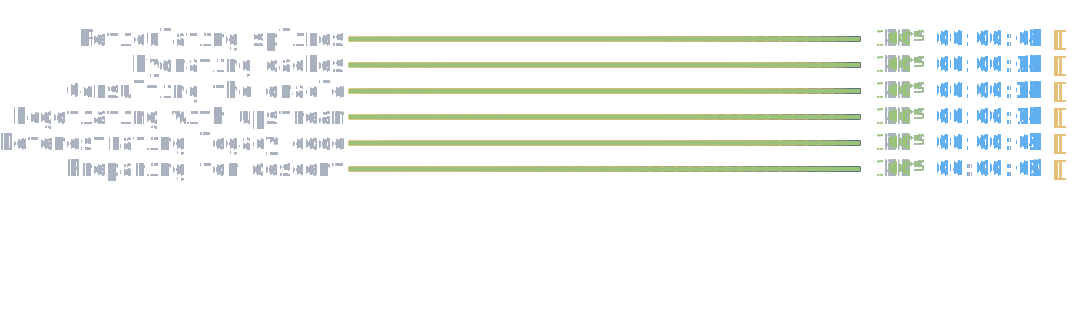
The Progress display renders animated progress bars for tracking task completion in real-time.
When to Use
Use Progress when you need to track completion status for long-running operations. Common scenarios:
- Multi-step processes: Show progress across multiple sequential or concurrent tasks
- File operations: Display download, upload, or processing progress
- Build pipelines: Track compilation, testing, and deployment steps
- Data processing: Monitor record processing, imports, or transformations
For simple status messages without progress tracking, use Status instead. For real-time data updates, consider Live Display.
Caution
Progress display is not thread safe. Using it together with other interactive components such as prompts, status displays, or other progress displays is not supported.
Basic Usage
Create a progress context and add tasks to track their completion.
AnsiConsole.Progress()
    .Start(ctx =>
    {
        var task = ctx.AddTask("Processing files", maxValue: 100);

        while (!ctx.IsFinished)
        {
            task.Increment(1);
            Thread.Sleep(50);
        }
    });
Managing Tasks
Multiple Tasks
Track several concurrent operations with individual progress bars.
AnsiConsole.Progress()
    .Start(ctx =>
    {
        var task1 = ctx.AddTask("Downloading images", maxValue: 125);
        var task2 = ctx.AddTask("Processing documents", maxValue: 50);
        var task3 = ctx.AddTask("Compiling code"); // maxValue defaults to 100

        while (!ctx.IsFinished)
        {
            task1.Increment(1.5);
            task2.Increment(0.8);
            task3.Increment(1.2);
            Thread.Sleep(50);
        }
    });
Increment vs Value Assignment
Use Increment() for relative progress updates or set Value directly for absolute positioning.
AnsiConsole.Progress()
    .Start(ctx =>
    {
        var task = ctx.AddTask("Processing records", maxValue: 100);

        // Increment by a specific amount
        for (int i = 0; i < 50; i++)
        {
            task.Increment(2);
            Thread.Sleep(20);
        }

        // Or set the value directly
        task.Value = 75;
        Thread.Sleep(500);

        task.Value = 100;
    });
Indeterminate Progress
Use IsIndeterminate() when the total duration or size is unknown, showing an animated progress bar without percentage.
AnsiConsole.Progress()
    .Start(ctx =>
    {
        var task = ctx.AddTask("Connecting to server")
            .IsIndeterminate();

        Thread.Sleep(2000);

        // Once we know the total, switch to determinate
        task.IsIndeterminate(false);
        task.MaxValue = 100;

        while (!ctx.IsFinished)
        {
            task.Increment(2);
            Thread.Sleep(30);
        }
    });
Adding Tasks Dynamically
Add new tasks during execution based on discovered work or changing requirements.
AnsiConsole.Progress()
    .Start(ctx =>
    {
        var scan = ctx.AddTask("Scanning directory");

        while (!scan.IsFinished)
        {
            scan.Increment(2);
            Thread.Sleep(50);
        }

        // After scanning, add new tasks for found items
        var process1 = ctx.AddTask("Processing report.pdf");
        var process2 = ctx.AddTask("Processing data.xlsx");

        while (!ctx.IsFinished)
        {
            process1.Increment(1.5);
            process2.Increment(1.2);
            Thread.Sleep(50);
        }
    });
Updating Descriptions
Change task descriptions during execution to provide detailed status updates.
AnsiConsole.Progress()
    .Start(ctx =>
    {
        var task = ctx.AddTask("Processing", maxValue: 100);

        for (int i = 1; i <= 100; i++)
        {
            task.Description = $"Processing file {i} of 100";
            task.Increment(1);
            Thread.Sleep(30);
        }
    });
Display Columns
Custom Column Configuration
Configure which information columns appear in the progress display using Columns().
AnsiConsole.Progress()
    .Columns(
        new TaskDescriptionColumn(),
        new ProgressBarColumn(),
        new PercentageColumn(),
        new RemainingTimeColumn())
    .Start(ctx =>
    {
        var task = ctx.AddTask("Processing data");

        while (!ctx.IsFinished)
        {
            task.Increment(0.5);
            Thread.Sleep(50);
        }
    });
Available Columns
| Column | Purpose |
|---|---|
TaskDescriptionColumn |
Shows the task description text |
ProgressBarColumn |
Displays the animated progress bar |
PercentageColumn |
Shows completion percentage |
RemainingTimeColumn |
Estimates time until completion |
ElapsedTimeColumn |
Shows time since task started |
SpinnerColumn |
Adds an animated spinner indicator |
DownloadedColumn |
Shows downloaded bytes (formatted) |
TransferSpeedColumn |
Shows transfer rate (bytes/sec) |
Spinner Animation
Add visual feedback with a spinning animation indicator.
AnsiConsole.Progress()
    .Columns(
        new TaskDescriptionColumn(),
        new ProgressBarColumn(),
        new PercentageColumn(),
        new SpinnerColumn())
    .Start(ctx =>
    {
        var task = ctx.AddTask("Analyzing files");

        while (!ctx.IsFinished)
        {
            task.Increment(0.8);
            Thread.Sleep(60);
        }
    });
Timing Information
Display elapsed time and remaining time estimates for operations.
AnsiConsole.Progress()
    .Columns(
        new TaskDescriptionColumn(),
        new ProgressBarColumn(),
        new PercentageColumn(),
        new ElapsedTimeColumn(),
        new RemainingTimeColumn())
    .Start(ctx =>
    {
        var task = ctx.AddTask("Converting video", maxValue: 100);

        while (!ctx.IsFinished)
        {
            task.Increment(1);
            Thread.Sleep(100);
        }
    });
Download Progress
Use specialized columns for file download scenarios with size and speed information.
AnsiConsole.Progress()
    .Columns(
        new TaskDescriptionColumn(),
        new ProgressBarColumn(),
        new DownloadedColumn(),
        new TransferSpeedColumn(),
        new RemainingTimeColumn())
    .Start(ctx =>
    {
        var task = ctx.AddTask("game-installer.exe", maxValue: 524288000); // 500 MB in bytes

        while (!ctx.IsFinished)
        {
            task.Increment(2621440); // 2.5 MB per tick
            Thread.Sleep(50);
        }
    });
Styling
Customize progress bar appearance with colors to match your application theme or convey meaning.
AnsiConsole.Progress()
    .Columns(
        new TaskDescriptionColumn(),
        new ProgressBarColumn()
        {
            CompletedStyle = new Style(Color.Green),
            FinishedStyle = new Style(Color.Lime),
            RemainingStyle = new Style(Color.Grey)
        },
        new PercentageColumn())
    .Start(ctx =>
    {
        var task = ctx.AddTask("Building project");

        while (!ctx.IsFinished)
        {
            task.Increment(1);
            Thread.Sleep(40);
        }
    });
Refresh Behavior
Auto Clear
Automatically remove the progress display after all tasks complete using AutoClear(true).
AnsiConsole.Progress()
    .AutoClear(true)
    .Start(ctx =>
    {
        var task = ctx.AddTask("Temporary operation");

        while (!ctx.IsFinished)
        {
            task.Increment(2);
            Thread.Sleep(50);
        }
    });

AnsiConsole.MarkupLine("[green]Operation complete![/]");
Hide Completed Tasks
Remove completed tasks from view while keeping active ones visible using HideCompleted(true).
AnsiConsole.Progress()
    .HideCompleted(true)
    .Start(ctx =>
    {
        var task1 = ctx.AddTask("Step 1", maxValue: 50);
        var task2 = ctx.AddTask("Step 2", maxValue: 50);
        var task3 = ctx.AddTask("Step 3", maxValue: 50);

        // Complete task 1
        while (!task1.IsFinished)
        {
            task1.Increment(2);
            Thread.Sleep(50);
        }

        // Complete task 2
        while (!task2.IsFinished)
        {
            task2.Increment(2);
            Thread.Sleep(50);
        }

        // Complete task 3
        while (!task3.IsFinished)
        {
            task3.Increment(2);
            Thread.Sleep(50);
        }
    });
Async Operations
Use StartAsync() for async/await scenarios with Task-based operations.
await AnsiConsole.Progress()
    .StartAsync(async ctx =>
    {
        var task1 = ctx.AddTask("Async operation 1");
        var task2 = ctx.AddTask("Async operation 2");

        var operations = new[]
        {
            Task.Run(async () =>
            {
                while (!task1.IsFinished)
                {
                    task1.Increment(1);
                    await Task.Delay(50);
                }
            }),
            Task.Run(async () =>
            {
                while (!task2.IsFinished)
                {
                    task2.Increment(0.8);
                    await Task.Delay(60);
                }
            })
        };

        await Task.WhenAll(operations);
    });
Returning Values
Progress operations can return values for use after completion.
var result = AnsiConsole.Progress()
    .Start(ctx =>
    {
        var task = ctx.AddTask("Processing items", maxValue: 100);
        int processedCount = 0;

        while (!ctx.IsFinished)
        {
            task.Increment(1);
            processedCount++;
            Thread.Sleep(20);
        }

        return processedCount;
    });

AnsiConsole.MarkupLine($"[green]Processed {result} items[/]");
See Also
- Show Progress Bars - Step-by-step guide
- Showing Status and Spinners - Learn progress basics
- Status Display - Simple spinner for indeterminate operations
- Spinner Styles Reference - Available spinner animations
API Reference
Represents a task list.
Properties
AutoClear
: boolGets or sets a value indicating whether or not the task list should be cleared once it completes. Defaults to false.
AutoRefresh
: boolGets or sets a value indicating whether or not task list should auto refresh. Defaults to true.
ExcludeVerticalPadding
: boolGets or sets a value indicating whether or not to exclude the vertical padding in the display. Defaults to false.
HideCompleted
: boolGets or sets a value indicating whether or not the task list should only include tasks not completed Defaults to false.
RefreshRate
: TimeSpanGets or sets the refresh rate if AutoRefresh is enabled. Defaults to 10 times/second.
RenderHook
: Func<IRenderable, IReadOnlyList<ProgressTask>, IRenderable>Gets or sets a optional custom render function.
Methods
public void Start(Action<ProgressContext> action)
Starts the progress task list.
Parameters:
action (Action<ProgressContext>)public T Start<T>(Func<ProgressContext, T> func)
Starts the progress task list and returns a result.
Parameters:
func (Func<ProgressContext, T>)Returns:
The result.
public Task StartAsync(Func<ProgressContext, Task> action)
Starts the progress task list.
Parameters:
action (Func<ProgressContext, Task>)Returns:
A Task representing the asynchronous operation.
public Task<T> StartAsync<T>(Func<ProgressContext, Task<T>> action)
Starts the progress task list and returns a result.
Parameters:
action (Func<ProgressContext, Task<T>>)Returns:
A Task representing the asynchronous operation.
Extension Methods
Progress AutoClear(this Progress progress, bool enabled)Sets whether or not auto clear is enabled. If enabled, the task tabled will be removed once all tasks have completed.
Returns:
The same instance so that multiple calls can be chained.
Progress AutoRefresh(this Progress progress, bool enabled)Sets whether or not auto refresh is enabled. If disabled, you will manually have to refresh the progress.
Returns:
The same instance so that multiple calls can be chained.
Progress Columns(this Progress progress, ProgressColumn[] columns)Sets the columns to be used for an Progress instance.
Returns:
The same instance so that multiple calls can be chained.
Progress ExcludeVerticalPadding(this Progress progress)Excludes the vertical padding in the display.
Returns:
The same instance so that multiple calls can be chained.
Progress ExcludeVerticalPadding(this Progress progress, bool enabled)Sets whether or not to exclude the vertical padding in the display. If enabled, the progress display will not include vertical padding.
Returns:
The same instance so that multiple calls can be chained.
Progress HideCompleted(this Progress progress, bool enabled)Sets whether or not hide completed is enabled. If enabled, the task tabled will be removed once it is completed.
Returns:
The same instance so that multiple calls can be chained.
Progress IncludeVerticalPadding(this Progress progress)Includes the vertical padding in the display.
Returns:
The same instance so that multiple calls can be chained.
Progress UseRenderHook(this Progress progress, Func<IRenderable, IReadOnlyList<ProgressTask>, IRenderable> renderHook)Sets an optional hook to intercept rendering.
Returns:
The same instance so that multiple calls can be chained.